FastVM wakes idle microVMs on demand. How fast is it?
How FastVM wakes idle microVMs, what a Firecracker-based service measured on the first request, and how Cloud Hypervisor compares at startup.
You open a preview link after lunch. The development server hasn’t seen a request in hours, but the process you left running still knows what it was doing. Keeping a VM awake buys that continuity at the cost of host memory. FastVM tries a third option: let the VM sleep and make the next request wake it. The question is how much memory the host gets back and how long that request has to wait.
FastVM is an experimental sandbox manager for a single Linux host. In November it switched from Firecracker to Cloud Hypervisor. Both run lightweight VMs with their own Linux kernel on top of KVM. The switch changed which devices FastVM can offer a workspace, without changing the idea behind wake-on-request.
What happens when a request arrives?
FastVM can turn the filesystem from a container image into a bootable guest disk. When that guest goes idle, its daemon first pauses the virtual CPUs while leaving RAM resident. If it goes into deeper sleep, FastVM saves a snapshot and reopens it with guest memory backed by a file. The host can then reclaim cached pages under memory pressure.
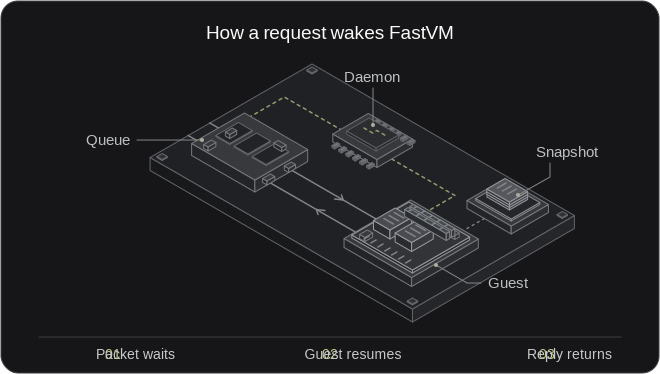
The virtual network queue stays available. An incoming packet both enters that path and signals the daemon to resume the guest. The server can pick up where it left off; if the pages it needs aren’t cached, fetching them adds to the first request’s wait.
How long does the first request wait?
FastVM’s network test logs time to establish a TCP connection and receive a reply from a paused guest. There’s no published distribution of those timings or of HTTP response times after deep sleep. The project’s 250 ms p95 from shallow pause and 500 ms p95 from deeper sleep (512 MB guest, warm page cache) are design targets from before the switch to Cloud Hypervisor.
There is a useful comparison from a Firecracker-based microVM. Developer Ondřej Tůma timed requests to the same renderer on Fly.io with the worker already running, suspended or stopped. The cold-request figures are medians of three runs.
| State before the request | FastVM on Cloud Hypervisor | Fly.io worker on Firecracker |
|---|---|---|
| Running | No published HTTP timing | About 150 ms |
| Paused with RAM resident | No published HTTP timing | Not tested |
| Disk-backed sleep / suspend | No published HTTP timing | About 590 ms |
| Stopped, then booted | No published HTTP timing | About 1,510 ms |
On Fly.io, restoring the suspended worker cut the first request from 1.51 s to 0.59 s, about 61% less time than restarting it. It still took roughly 440 ms longer than reaching the already-running worker. In the Fly.io test, an always-on proxy starts the worker. FastVM signals wake from the virtual network path, without an application proxy. To measure FastVM instead, the first-request benchmark script uses a fresh connection for each trial and collects median and p95 time to first byte from the same running, paused and dormant guest. Run it on a Linux KVM host against a disposable sandbox.
Why switch from Firecracker?
The migration notes point to host directory sharing. Cloud Hypervisor’s virtio-fs device lets the guest mount a directory from the host, so a preview server can see local project files without copying them into its image. The November 25 development build added live CPU and memory resizing within limits set at creation. Those are workspace features. Whether the switch makes the machine faster is a separate question.
Firecracker vs. Cloud Hypervisor: startup benchmarks
| Test | Firecracker | Cloud Hypervisor |
|---|---|---|
| AWS, NSDI 2020: VM boot with 50 launches in parallel, p99 | 146 ms (preconfigured) | 158 ms |
| OpenSandbox: Kata sandbox creation on a non-nested KVM host, p50 | 560 ms | 829 ms |
| OpenSandbox: Kata sandbox creation in a resource-constrained nested VM, p50 | 5,462 ms | 1,335 ms |
In AWS’s historical boot test, preconfigured Firecracker’s tail latency was 12 ms lower. OpenSandbox timed 20 Kata sandbox creations per runtime in each setup. Firecracker took about 32% less time on the non-nested host. On the nested setup, Cloud Hypervisor took about 76% less time; Firecracker spent much more time setting up its block-backed storage.
FastVM separately reports about 600 ms from cold boot to guest-agent ready on Cloud Hypervisor v54.0. That starts the VM from scratch; the preview link after an idle period takes the resume path.
What the preview link has to wait for
If you open that preview link after lunch, FastVM can bring back the process you left running. Whether you notice the wait depends on how much memory the host reclaimed and how much of it the server needs for that first response. That’s the number to check before choosing how deeply to let the workspace sleep.
Sources
Loading content…