VPS Hosting for AI Agents: What’s Under the Sandbox?
Compare VPS hosting for AI agents, what Agent37’s full VM costs, where Firecracker fits, and how shared hardware and pricing affect always-on workloads.
Another day, another cloud agent platform. If you’ve caught up on the Binance crypto breach, there’s another development worth your attention: the growing list of platforms promising cheap compute for AI agents. Their pitch is straightforward—move the agent off your laptop, keep it running in an isolated workspace, and pay only a few dollars for the compute. But what does that price actually buy?
The advertised CPU rate is only one part of running an agent. Its tools need memory, disk space and network access, whether they are installing dependencies, compiling code or running a browser. A machine that handles a few API calls may struggle with a full build, and keeping it available between tasks changes the bill.
To judge these offers, we’ll compare the advertised machines, look at the infrastructure underneath them, and work through the total cost and workload limits behind the starting price.
What the advertised prices buy
Agent37 advertises a $4.76 shared sandbox; its full Linux VM costs $11.36 at the configuration below. Cube offers a personal cloud computer, while InstaBox and Superserve expose machines through developer tools and APIs. Manus adds a persistent computer to its agent platform. These overlap, but they are not identical products. The comparison uses machines with persistent workspaces that can stay running.
| Offer | What you control | How it bills |
|---|---|---|
| Agent37 full VM | Persistent disk, your own Linux kernel, a terminal and exposed service ports. Use its Claude Code, Codex, Hermes or OpenClaw templates, or bring your own harness. | $11.36 for 730 hours at 2 vCPUs, 4 GB RAM and 4 GB retained disk. That is $4.40 × 2.5 for compute plus $0.36 for disk. Stopping compute leaves the disk meter. |
| Cube Computer | SSH into a personal Linux machine. Git worktrees and installers for Claude Code, Codex and other agents handle setup. Pausing retains files and ends running processes. | $12 for 730 hours running or $4 for 730 hours paused, with 2 shared vCPUs, 4 GB RAM and 30 GB SSD. |
| InstaBox Pro | SSH, persistent data and public HTTPS port forwarding on Firecracker. Paid plans let you turn idle pause off. | $20/month plus usage. Running rates are $0.004/vCPU-hour and $0.00225/GiB-hour of RAM, with separate disk and egress rates. The free machine has a mandatory 30-minute idle pause. |
| Superserve Developer | Shell commands and files via its API or CLI, persistent Firecracker state and optional auto-pause. Paid sessions have no fixed time limit. | $20/month with $20 of usage included. Rates are $0.0504/vCPU-hour, $0.0162/GiB-hour of running RAM and $0.000108/GiB-hour of retained storage. |
| Manus Cloud Computer | A persistent Ubuntu server with SSH and a web terminal. You can use it directly or have Manus deploy apps and bots to it. | $30/month for Standard with 2 vCPUs, 4 GB RAM and 70 GB storage. Manus agent usage has separate pricing. |
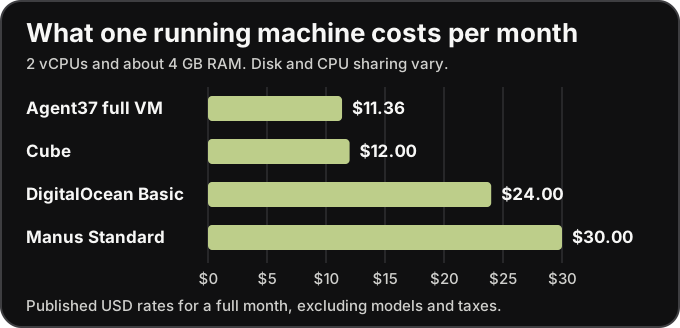
For comparison, renting 2 vCPUs and 4 GB of RAM from an established hosting provider such as DigitalOcean costs $24 a month. That makes the roughly $12 offers from Agent37 and Cube look attractive for running an agent. The question is how they keep that price low and what you still have to pay for separately.
Different platforms, a familiar Firecracker foundation
Several of these platforms trace their sandbox technology back to AWS’s Firecracker. It uses Linux’s KVM virtualization support to run lightweight virtual machines, each with its own operating-system kernel. AWS developed it for services such as Lambda and Fargate, then released it as open-source software. That gives newer platforms an established foundation for isolating agent workloads. Our Firecracker microVM explainer covers how that boundary works.
The dependence can extend to the infrastructure itself. Cube runs its machines and filesystems on Fly.io, which uses Firecracker. Manus has an infrastructure partnership with AWS. InstaBox takes a different route: it says it runs Firecracker on its own bare metal. These are different ways of obtaining the same expensive ingredients: processors, RAM, storage and network capacity.
That is the tension behind the cheap-compute pitch. TrendForce reports growing CPU and DDR5 demand from AI inference and continued pressure on memory supply. Building a fleet means competing for those components; using an existing cloud provider means paying someone who already has them. A new agent interface does not remove that underlying cost.

A low retail price therefore needs an economic explanation: shared capacity, machines that sleep between tasks, purchasing advantages, or a subsidy that covers the gap. The useful question is how much sustained work that price supports once the agent starts building, testing and running tools. Firecracker makes small isolated machines practical; it does not make their physical resources free.
Cheap CPU is only part of the bill
Give an agent a fresh repository and the infrastructure bill starts with getting it ready. It downloads the code and dependencies, unpacks them, installs tools and runs a build. CPU does the work, RAM holds the running processes, disk keeps the files, and the network moves them in and out. The advertised CPU rate covers only part of that setup.
The traffic has two directions. Inbound brings in the checkout, packages and browser binaries. Outbound carries uploaded build artifacts, results and responses from services running in the sandbox. Check the allowance for each direction: a plan may include incoming traffic while charging for outgoing data beyond a limit. “Network included” needs a number attached to it.
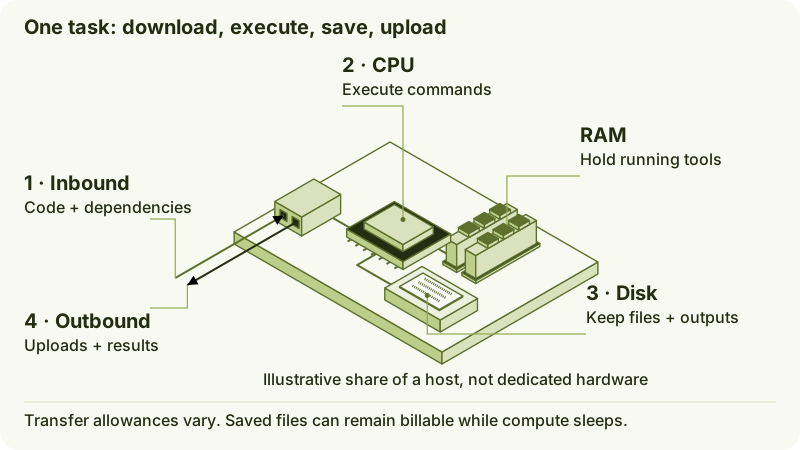
The less obvious costs are often in what stays allocated or saved. CPU and RAM may be billed while the machine is running even if the agent is waiting. Stopping it can end those charges while its disk and snapshots remain billable. Repeated builds can also leave caches and output behind, gradually increasing the space you need.
That is where a small starting price can grow: more RAM for the tools, more disk for the workspace, or more outbound traffic than the plan includes. These charges may be documented further down the pricing page, but they belong in your estimate from the start. Compare the cost of the complete workspace, including what you keep between tasks.
And that workspace has to be usable. On a small allowance, installing the agent, its browser and the project’s dependencies can consume a meaningful share of the budget before the first task finishes. Once setup is done, does the machine have enough memory, processing capacity and free disk to finish the task?
Can the cheap machine run your agent’s tools?
Opening an agent in a browser does not mean its workflow runs inside that browser. The cloud machine still has to run the terminal commands, build tools and any browser automation the agent needs. A web interface makes the machine easier to reach; it does not reduce what those tools require.
A small custom agent that calls APIs and runs a few scripts can fit comfortably into a modest workspace. A coding agent working through a large repository needs more room. The checkout is only the start: package caches, installed dependencies, browser binaries and build output can fill a small disk before the first task is finished.
Then the tools have to run. A compiler needs CPU time; a browser and several test workers need RAM. If the machine runs out of memory, processes can fail and need another attempt. If shared CPU capacity slows a build, the machine may stay billable for longer. A cheaper hour does not always produce a cheaper completed task.
| Work you give the agent | What the machine needs to handle |
|---|---|
| Install the agent and project tools | Downloads, unpacking, dependency caches and enough free disk for the finished installation. |
| Edit code and run tests | CPU time and peak RAM for the actual repository, including parallel test workers. |
| Automate a browser | Browser binaries on disk, memory for pages and processes, and network access to the target sites. |
| Run several agents or services | Enough CPU and RAM for overlapping work, rather than each task considered alone. |
| Keep a bot or webhook listener available | A running machine or a supported external wake-up mechanism; a timer inside a sleeping VM cannot wake it. |
Before choosing the smallest plan, try one complete run from installation to finished task. Note the time taken, peak memory, disk left after setup and transfer usage. Repeat it with the saved workspace to see whether cached dependencies reduce the cost. These are checks to run on your own workload, not benchmarks of the providers above.
The services around the machine matter too. Two similarly priced offers can serve quite different needs, as Cube and Agent37 illustrate.
Similar prices can buy different workflows
Cube fits the remote development workspace. Keep a checkout there, connect over SSH, use its terminal tools and leave a coding task running after closing your laptop. The smallest machine bundles CPU, RAM and disk for $12 a month running, or $4 paused. Pausing keeps your files but ends running processes, so an overnight build or listener needs the machine left on.
Agent37 fits an application that gives each customer an agent workspace. Its API creates separate sandboxes with an existing agent template or your own harness, keeping each customer’s files and tools together between sessions. The $11.36 full-VM example covers one configured workspace running all month. More customers mean more workspaces to budget for; compute stops billing when a sandbox sleeps, while retained disk continues until deleted.
What the launch price needs to cover
The appeal of these launches is real: a ready-to-use workspace can save you the effort of setting up and managing a server. Firecracker and shared infrastructure help providers offer those workspaces at small starting prices. The question is whether that price still works once your agent installs its tools, runs a build, keeps its files and sends the results back.
For any platform on the shortlist, judge the cost of a completed task and the workspace you keep afterwards. Try a representative job, account for CPU, RAM, disk and network, and check what continues billing between runs. A cheap launch price is useful when it buys enough capacity to get your work done.
Sources
- Agent37 pricing and capabilities
- Agent37 Cloud API
- Cube billing and specifications
- Cube agent setup
- InstaBox billing
- InstaBox machine lifecycle
- Superserve plans and lifecycle
- Superserve pricing
- Manus Cloud Computer plans and billing
- Manus membership
- DigitalOcean pricing
- Cube infrastructure
- Fly Machines
- AWS and Manus
- InstaBox’s fleet
- TrendForce: CPU and DDR5 demand
- TrendForce: memory supply outlook
- Manus Cloud Computer uptime
Loading content…