RayClay 1.0 brings web-style layouts to C apps
RayClay combines flexbox-style layouts, widgets and networking in C. How its cross-platform rendering works, what its benchmarks show, and where v1.0 falls short.
How big should a download be for an app that takes notes? In RayClay’s Windows test, the same notepad shipped at 1.1 MiB with RayClay and 94.8 MiB with Electron.
The difference starts with what each app brings along to draw its screen. Electron bundles a browser engine. RayClay 1.0 draws the interface itself and lets developers write both the layout and the application logic in C. The MIT-licensed framework builds for Windows, macOS, Linux, iOS, Android and the web. The project released version 1.0 on November 22.
How a C layout becomes a screen
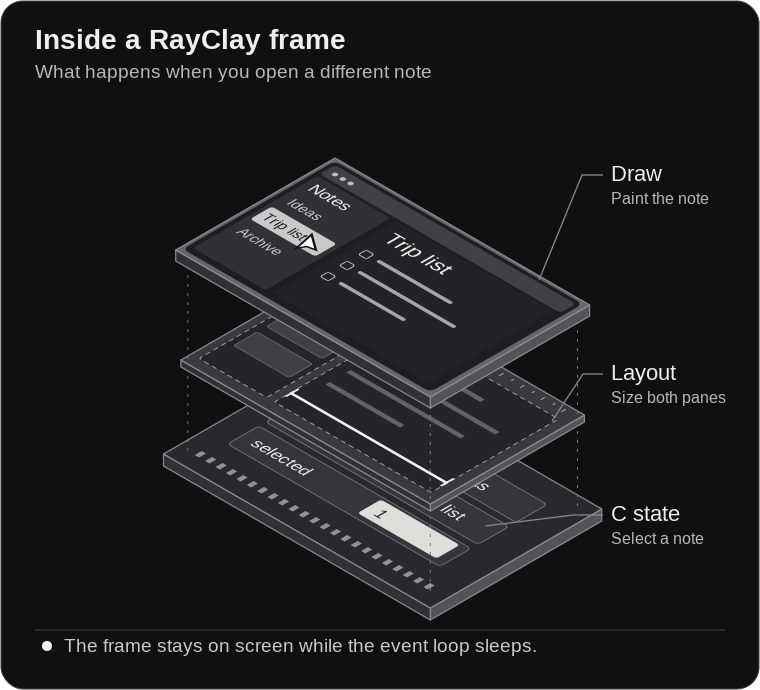
A notes app often puts the list of notes beside the open document. RayClay lets the developer express that arrangement as a row, give the list a fixed width and let the editor fill the space beside it. When the window grows, the editor grows with it. This flexbox-style approach also works for columns and nested layouts. RayClay’s version of the Clay layout engine calculates where those elements fit, so the app can describe their relationship without calculating pixel coordinates whenever the window changes size.
Now select a different note. The app records which note is open in a C structure. When RayClay draws the next frame, the layout function reads that state and supplies the selected text to the editor. Stable IDs let RayClay recognize the same controls between frames and track details such as keyboard focus and scroll position. Once the screen settles, the default rendering loop sleeps until something needs its attention again. The project documents this cycle in its guide to how a frame works.
The same layout reaches each screen through a different graphics API. RayClay draws its own controls using Metal by default on Apple devices and Direct3D 11 on Windows. For the browser, the C code compiles to WebAssembly, with JavaScript handling integration and WebGL 2 drawing the interface into a canvas. That differs from frameworks such as Whisker, which maps shared UI declarations onto the phone’s own views. See the RayClay web build and how Whisker renders on mobile.
What the notepad actually ships
RayClay’s developer built the same three apps with several frameworks on Windows 11. The figures below count the files each app ships, excluding runtimes already on the system. The project publishes the workloads and measurements in its desktop comparison.
| Windows app | RayClay 1.0 | Electron 43.1.1 |
|---|---|---|
| Empty window | 922 KiB | 94.8 MiB |
| Notepad | 1.1 MiB | 94.8 MiB |
| Analytics dashboard | 1.2 MiB | 94.9 MiB |
Even the empty window accounts for most of the shipped size in both frameworks. Runtime memory tells a different part of the story. With that window sitting idle, the project measured 33.6 MiB for RayClay and 141.7 MiB for Electron, using the median of five launches. Neither measurement tells us how quickly the editor responds to a keystroke.
The compact result still takes a full platform build. Although the release offers a single C header, a graphical app also needs the windowing code and bundled dependencies from the source tree. The project provides a CMake build and a starter template.
For a notepad, the most consequential limit shows up after launch. RayClay can draw the editor and track its keyboard focus, but v1.0 lists accessibility and system text-size support as missing. A team can share the editing interface across six targets and ship a small desktop app. If readers need a screen reader or rely on larger system text, the framework still leaves a central part of that reading experience unresolved. RayClay’s documented v1.0 limits.
Loading content…